Category Archives: Oracle Apps DBA

EBS Workflow Notification Mailer Override Address 

You can verify Override Address using the below SQL:

select fscpv.parameter_value from fnd_svc_comp_params_tl fscpt ,fnd_svc_comp_param_vals fscpv where fscpt.display_name = ‘Test Address’ and fscpt.parameter_id = fscpv.parameter_id;

Update Override Address using the below SQL:

update fnd_svc_comp_param_vals fscpv set fscpv.PARAMETER_VALUE = ‘admin@oracle-homes.com’ where fscpv.parameter_id in ( select fscpt.parameter_id from fnd_svc_comp_params_tl fscpt where fscpt.display_name = ‘Test Address’);

You can verify the same Override Address using the below SQL:

select fscpv.parameter_value from fnd_svc_comp_params_tl fscpt ,fnd_svc_comp_param_vals fscpv where fscpt.display_name = ‘Test Address’ and fscpt.parameter_id = fscpv.parameter_id;

Happy Learning!!

Provision Oracle EBS 12.2.14 Latest Vision Instance on Oracle Cloud Infrastructure in 30 minutes

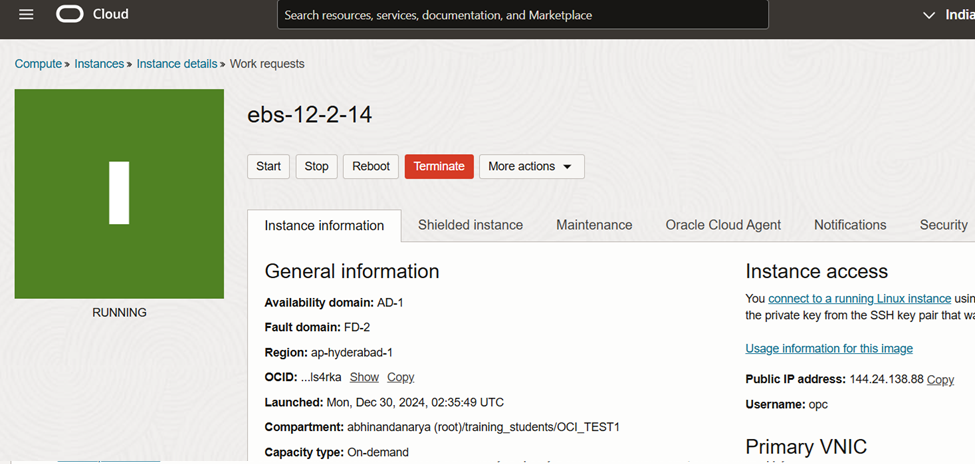
Create an Oracle Cloud Infrastructure Compute instance (VM) containing the Release 12.2.14 database and application tiers from one of the provided images

Database Version – Oracle Database 19c (19.24 RU)

Oracle E-Business Suite Version – 12.2.14

Operating System – Oracle Linux 8 8.10 64-bit

Choose the Image from Market place

Select Image – Oracle E-Business Suite 12.2.14 Demo Install Image 

Select Shape

Please visit this page for VCN and Subnet creation – OCI – Creating Virtual Cloud Network(VCN) with Public and Private Subnets

 please visit this page for Compute Instance creation –  OCI – Create OCI Compute Instance

 Connect to Compute Instance and Perform Post-Install Steps

$ sudo su -
# yum update
Is this ok [y/d/N]: y

# firewall-cmd --add-port=8000/tcp --permanent
# systemctl restart firewalld

# firewall-cmd --list-all
Update Hostname
# /u01/install/scripts/updatehosts.sh

Configure Web Entry Point
$ /u01/install/scripts/configwebentry.sh
Enter the Web Entry Protocol (Eg: https/http): http
Enter the Web Entry Host Name(Eg: public): myapps
Enter the Web Entry Domain Name:(Eg: example.com): example.com
Enter the Web Entry Port:(Eg: 443/80): 8000
Enter the ORACLE_SID:(Eg: EBSDB): EBSDB
Running AutoConfig to complete the configuration

Enter the APPS user password: <apps_password>

Enable and Change SYSADMIN Password

$ sudo -i -u oracle
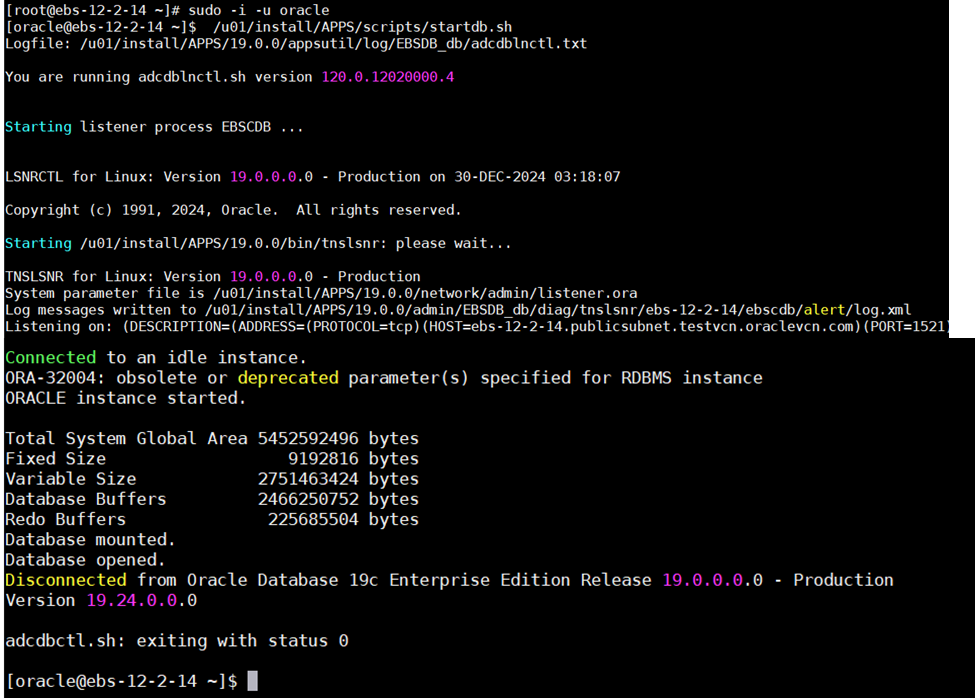
$ /u01/install/APPS/scripts/startdb.sh
$ /u01/install/APPS/scripts/startapps.sh
$ . /u01/install/APPS/EBSapps.env run

$ mkdir -p ~/logs

$ cd ~/logs
$ sh /u01/install/APPS/scripts/enableSYSADMIN.sh

Now add the Host Entry in your Windows Laptop/Desktop with the EBS VM Instance IP. Access the Oracle EBS URL

C:\\Windows\System32\drivers\etc

Happy Learning !!

adcfgclone.pl appsTier dualfs

DUALFS – new feature is introduced in the latest AD-TXK Delta 7. 

This feature will create both the filesystems fs1 and fs2 during the clonning process.

[appldev@ebbs-app01]$ perl adcfgclone.pl appsTier dualfs

Copyright (c) 2002, 2015 Oracle Corporation
Redwood Shores, California, USA

Oracle E-Business Suite Rapid Clone

Version 12.2

adcfgclone Version 120.63.12020000.56

Enter the APPS password :

Enter the Weblogic AdminServer password :

Do you want to add a node (yes/no) [no] :
Running: Context clone…

Log file located at /EBS/oracle/fs1/EBSapps/comn/clone/bin/CloneContext_2123174759.log

Provide the values required for creation of the new APPL_TOP Context file.

Target System Hostname (virtual or normal) [ebs-app01] :

Target System Database SID : oracle

Target System Database Server Node [ebs-app01] : ebs-db01

Target System Database Domain Name [oracle.com] :

Target System Base Directory : /EBS/oracle

Target System Base Directory set to /EBS/oracle

Target System Current File System Base set to /EBS/oracle/fs1

Target System Other File System Base set to /EBS/oracle/fs2

Target System Fusion Middleware Home set to /EBS/oracle/fs1/FMW_Home
Target System Other File System Fusion Middleware Home set to /EBS/oracle/fs2/FMW_Home

Target System Web Oracle Home set to /EBS/oracle/fs1/FMW_Home/webtier
Target System Other File System Web Oracle Home set to /EBS/oracle/fs2/FMW_Home/webtier

Target System Appl TOP set to /EBS/oracle/fs1/EBSapps/appl
Target System Other File System Appl TOP set to /EBS/oracle/fs2/EBSapps/appl

Target System COMMON TOP set to /EBS/oracle/fs1/EBSapps/comn
Target System Other File System COMMON TOP set to /EBS/oracle/fs2/EBSapps/comn

Target System Instance Home Directory [/EBS/oracle] : /EBS/oracle

Target System Current File System Instance Top set to /EBS/oracle/fs1/inst/apps/oracle_ebs-app01

Do you want to preserve the Display [ebs-papp01:0.0] (y/n) : n

Target System Display [ebs-app01:0.0] :

Target System Root Service [enabled] :

Target System Web Entry Point Services [enabled] :

Target System Web Application Services [enabled] :

Target System Batch Processing Services [enabled] :

Target System Other Services [disabled] :

Do you want the target system to have the same port values as the source system (y/n) [y] ? : n

Target System Port Pool [0-99] : 0

Checking the port pool 90
done: Port Pool 90 is free
Report file located at /EBS/oracle/fs1/inst/apps/oracle_ebs-app01/admin/out/portpool.lst

UTL_FILE_DIR on database tier consists of the following directories.

1. /usr/tmp
2. /usr/tmp
3. /EBS/oracle/product/12.1.0/appsutil/outbound/oracle_ebs-app01
4. /usr/tmp
Choose a value which will be set as APPLPTMP value on the target node [1] : 3
The new APPL_TOP context file has been created :
/EBS/oracle/fs1/inst/apps/oracle_ebs-app01/appl/admin/oracle_ebs-app01.xml
Check Clone Context logfile /EBS/oracle/fs1/EBSapps/comn/clone/bin/CloneContext_2123184759.log for details.

Creating Patch file system context file…..

Log file located at /EBS/oracle/fs1/EBSapps/comn/clone/bin/CloneContextPatch_2123184843.log

Target System Other File System Instance Top set to /EBS/oracle/fs2/inst/apps/oracle_ebs-app01

Target System Port Pool [0-99] : 2

Thank You !!

RC-50013 Fatal: Instantiate driver

Error:

Seen the issue during the execution of adcfgclone.

perl adcfgclone.pl dbTechStack

====================

WARNING: [AutoConfig Error Report]
The following report lists errors AutoConfig encountered during each
phase of its execution. Errors are grouped by directory and phase.
The report format is:
<filename> <phase> <return code where appropriate>

[APPLY PHASE]
AutoConfig could not successfully execute the following scripts:
Directory: /EBS/oracle/product/12c/perl/bin/perl -I /EBS/oracle/product/12c/perl/lib/5.14.1 -I /EBS/oracle/product/12c/perl/lib/site_perl/5.14.1 -I /EBS/oracle/product/12c/appsutil/perl /EBS/oracle/product/12c/appsutil/clone
ouicli.pl INSTE8_APPLY 1

AutoConfig is exiting with status 1

WARNING: RC-50013: Fatal: Instantiate driver did not complete successfully.
/EBS/oracle/product/12c/appsutil/driver/regclone.drv

====================

CAUSE:

The script was trying to register the oracle home in inventory but its failing to update it.

SOLUTION:

Please delete existing files under oraInventory folder and retry the adcfgclone.

[oracle@ebsdb01 bin]$ cat /etc/oraInst.loc
inst_group=dba
inventory_loc=/EBS/oracle/product/oraInventory
cd /EBS/oracle/product
rm -rf oraInventory
mkdir oraInventory

Retry :   perl adcfgclone.pl dbTechStack

Thank you !!


ADOP FS_CLONE Fails with OutOfMemoryError: Java Heap Space Error

ERROR:

Exception in thread “Thread-1” java.lang.OutOfMemoryError: GC overhead limit exceeded

SOLUTION:

[oratst@xxxxxx ]$ export CONFIG_JVM_ARGS=”-Xms1024m -Xmx2048m”

[oratst@xxxxxx ]$ echo $CONFIG_JVM_ARGS
-Xms1024m -Xmx2048m

re-executes  completed successfully

adop phase=fs_clone force=Yes

NLS boot file not found or invalid opmnctl ping – EBS 12.2 ADCFGCLONE FAIL

adcfgclone.pl failed while performing clone of EBS 12.2 instance. This occurred while ohsT2PApply is in progress.

ERROR:

INST_TOP/admin/log/clone/run/ohsT2PApply/CLONE2016-02-02_13-10-02_599255196.error:
2015-12-02T3:10:04-06:00] [opmn] [ERROR:1] [] [internal]...
2015-12-02T13:10:04-06:00] [opmn] [ERROR:1] [] [internal] lxlinit - NLS boot file not found or invalid
opmnctl ping: error parsing /u01/tech_st/fs1/FMW_Home/webtier/instances/EBS_web_EBDEV_OHS1/config/OPMN/opmn/opmn.xml
[2015-12-02T3:10:04-06:00] [opmn] [ERROR:1] [105] [internal] XML parser init: character set initialization failed.
SEVERE : Dec 2, 2016 03:10:04 - ERROR - CLONE-20218   Cloning is not successful.
SEVERE : Dec 2, 2016 03:10:04 - CAUSE - CLONE-20218   An internal operation failed.
SEVERE : Dec 2, 2016 03:10:04 - ACTION - CLONE-20218   Provide the clone log and error file for investigation.

Solution:

Issue is because of existing environment variables. Before executing the adcfgclone verify any of the the environment is set. If already set please try to unset and run adcfgclone.

Else, Unset the following environment:
ORA_NLS10
TNS_ADMIN
ORACLE_HOME


Thank You !!


EBS 12.2 Upgrade and Installation Logs

Before the installation starts:

$TMP/<MMDDHHMM>/<MMDDHHMM>.log
$TMP/<MMDDHHMM>/<hostname>_<SID>.xml
$TMP/<MMDDHHMM>/<hostname>_<SID>_apps.xml

The Rapidwiz Configuration File is saved in 4 locations:

$TMP/<MMDDHHMM>/conf_<SID>.txt
Primary $INST_TOP/conf_<SID>.txt
Secondary $INST_TOP/conf_<SID>.txt
<RDBMS ORACLE_HOME>/appsutil/conf_<SID>.txt

Preinstall System Check logs:

$TMP/<MMDDHHMM>/<MMDDHHMM>.log
$TMP/dbPreInstCheck.xxxxx.log
$TMP/wtprechk.xxxx/wtprechk.xxxx.log

<Global Inventory>/logs/installActions<timestamp>.log

Database Tier:

Main installation log:

RDBMS $ORACLE_HOME/appsutil/log/$CONTEXT_NAME/<MMDDHHMM>.log

Oracle Home installation logs:

RDBMS $ORACLE_HOME/temp/$CONTEXT_NAME/logs/oracle.apps.fnd.txk.install0.log
RDBMS $ORACLE_HOME/temp/$CONTEXT_NAME/logs/oracle.apps.fnd.txk.default0.log
<Global Inventory>/logs/<timestamp>.log
<Global Inventory>/logs/cloneActions<timestamp>.log
<Global Inventory>/logs/install<timestamp>.log
<Global Inventory>/logs/installActions<timestamp>.log
<Global Inventory>/logs/installProfile<timestamp>.log
<Global Inventory>/logs/installSummary<timestamp>.log
<Global Inventory>/logs/OPatch<timestamp>.log
<Global Inventory>/logs/oraInstall<timestamp>.log
<Global Inventory>/logs/silentInstall<timestamp>.log

RMAN restore scripts (Install mode only):

<RDBMS Oracle Home>/appsutil/out/$CONTEXT_NAME/restore-rac1.log
<RDBMS Oracle Home>/appsutil/out/$CONTEXT_NAME/restore-rac2.log
<RDBMS Oracle Home>/appsutil/out/$CONTEXT_NAME/restore-rac3.log
<RDBMS Oracle Home>/appsutil/out/$CONTEXT_NAME/restore-single1.log
<RDBMS Oracle Home>/appsutil/out/$CONTEXT_NAME/restore-single2.log
<RDBMS Oracle Home>/appsutil/out/$CONTEXT_NAME/restore-single3.log
<RDBMS Oracle Home>/appsutil/out/$CONTEXT_NAME/LogOff.sql
<RDBMS Oracle Home>/appsutil/out/$CONTEXT_NAME/fndClean.sql

Database characterset conversion (Install mode only):

<ORACLE_HOME>/appsutil/log/<Context Name>/addbccnv.txt

AutoConfig context file:

<RDBMS ORACLE_HOME>/appsutil/<Context Name>.xml

AutoConfig logs:

<RDBMS ORACLE_HOME>/appsutil/log/<Context Name>/<MMDDHHMM>/adconfig.log
<RDBMS ORACLE_HOME>/appsutil/log/<Context Name>/<MMDDHHMM>/NetServiceHandler.log
<RDBMS ORACLE_HOME>/temp/$CONTEXT_NAME/RACAutoConfig_nnnnn.log

Listener log:

<RDBMS ORACLE_HOME>/appsutil/log/$CONTEXT_NAME/addlnctl.txt

Applications Tier(s):

Both Primary (Run) and Secondary Edition (Patch) file systems will each contain these logs:

Main installation log:

$INST_TOP/logs/<MMDDHHMM>.log
FMW and OHS TechStack Installation/Patching logs:

$APPL_TOP/admin/$CONTEXT_NAME/log/installAppl.log
$APPL_TOP/admin/$CONTEXT_NAME/log/ebsfmwlayout.log
$APPL_TOP/admin/$CONTEXT_NAME/log/NetServiceHandler.log
$APPL_TOP/admin/$CONTEXT_NAME/log/adcvmlog.xml
$APPL_TOP/admin/$CONTEXT_NAME/log/executeac.log
$APPL_TOP/admin/$CONTEXT_NAME/log/deploytech.log

$APPL_TOP/admin/$CONTEXT_NAME/logs/wls1036.log
$APPL_TOP/admin/$CONTEXT_NAME/logs/oracle.apps.fnd.txk.default0.log
$APPL_TOP/admin/$CONTEXT_NAME/logs/oracle.apps.fnd.txk.install0.log

<Global Inventory>/logs/<timestamp>.log
<Global Inventory>/logs/cloneActions<timestamp>.log
<Global Inventory>/logs/install<timestamp>.log
<Global Inventory>/logs/installActions<timestamp>.log
<Global Inventory>/logs/installProfile<timestamp>.log
<Global Inventory>/logs/installSummary<timestamp>.log
<Global Inventory>/logs/OPatch<timestamp>.log
<Global Inventory>/logs/oraInstall<timestamp>.log
<Global Inventory>/logs/silentInstall<timestamp>.log

Forms Oracle Home installation logs:

$APPL_TOP/admin/$CONTEXT_NAME/log/ApplyAppsTechStack.log

$INST_TOP/admin/log/ohclone.log
$INST_TOP/admin/log/ApplyAppsTechStack_<MMDDHHMM>.log

Service Control logs :

$INST_TOP/logs/appl/admin/log/adadminsrvctl.txt
$INST_TOP/logs/appl/admin/log/adalnctl.txt
$INST_TOP/logs/appl/admin/log/adapcctl.txt
$INST_TOP/logs/appl/admin/log/adcmctl.txt
$INST_TOP/logs/appl/admin/log/adforms-c4wsctl.txt
$INST_TOP/logs/appl/admin/log/adformsctl.txt
$INST_TOP/logs/appl/admin/log/adnodemgrctl.txt
$INST_TOP/logs/appl/admin/log/adoacorectl.txt
$INST_TOP/logs/appl/admin/log/adoafmctl.txt
$INST_TOP/logs/appl/admin/log/adopmnctl.txt
$INST_TOP/logs/appl/admin/log/adstpall.log
$INST_TOP/logs/appl/admin/log/adstrtal.log
$INST_TOP/logs/appl/admin/log/jtffmctl.txt


Thank You !!

Perl lib version (v5.8.8) doesn’t match executable version (v5.10.0)

Issue while running adcfgclone on target database node, I can see below error messages in logfiles..

ERROR:

perl adcfgclone.pl dbTechStack
RC-00110: Fatal: Error occurred while relinking of ApplyDBTechStack
Perl lib version (v5.8.8) doesn’t match executable version (v5.10.0) at /usr/lib64/perl5/5.8.8/x86_64-linux-thread-multi/Config.pm line 46.
Compilation failed in require at /u01/oracle/product/11.2.0/appsutil/clone/ouicli.pl line 35.
BEGIN failed–compilation aborted at /u01/oracle/product/11.2.0/appsutil/clone/ouicli.pl line 35.

AutoConfig is exiting with status 1

RC-50013: Fatal: Instantiate driver did not complete successfully.
/u01/oracle/product/11.2.0/appsutil/driver/regclone.drv

SOLUTION:

1. Make a backup copy of your existing Database Contextfile.

2. Modify the context file as shown.
BEFORE :

<PERL5LIB oa_var=”s_perl5lib” osd=”unix”>/<complete path>/db/tech_st/11.2.0/perl/lib/5.8.3: \\
/<complete path>/db/tech_st/11.2.0/perl/lib/site_perl/5.8.3:/<complete path>/db/tech_st/11.2.0/appsutil/perl</PERL5LIB>

AFTER :

<PERL5LIB oa_var=”s_perl5lib” osd=”unix”>/<complete path>/db/tech_st/11.2.0/perl/lib/5.10.0: \\
<complete path>/db/tech_st/11.2.0/perl/lib/site_perl/5.10.0:/<complete path>/db/tech_st/11.2.0/appsutil/perl</PERL5LIB>

3. Execute Autoconfig to get the modifications implemented.


Thank You!!

R12.2 Adcfgclone.pl ERROR Exit Code 255

when attempting to run perl adcfgclone.pl appsTier, the following error occurs:

ERROR:

Log file located at /local/FDEV/fs2/inst/apps/FDEV_lapdev01/admin/log/clone/ApplyAppsTier_05301531.log
– 50% completed
ERROR while running Apply…
Fri May 30 17:37:39 2014
ERROR: Failed to execute /fs02/app/FDEV/apps/fs2/EBSapps/comn/clone/bin/adclone.pl


CAUSE:

The admin server logs are located under:
$EBS_DOMAIN_HOME/servers/AdminServer/logs directory

java.io.FileNotFoundException: /var/tmp/.ovdlock.tmp (Permission denied)
Caused By: oracle.security.jps.JpsRuntimeException: JPS-02592: Failed to push ldap config data to libOvd for service instance “idstore.ldap” in JPS context “default”, cause: java.io.FileNotFoundException: /var/tmp/.ovdlock.tmp (Permission denied)

This is caused by the file “/var/tmp/.ovdlock.tmp” having been created by another test iteration by a different UNIX user.
The current clone cannot succeed because the file cannot be over-written.

SOLUTION:

1. Rename or delete the file:
$ mv /var/tmp/.ovdlock.tmp /var/tmp/.ovdlock.tmp.bak

2. Restart the clone command:
$ perl adcfgclone.pl appsTier


Thank You !!

R12.2 ADCFGCLONE FAILS

During the R12.2 cloning process adcfgclone fails with below error message:

ERROR :

Below Oracle Homes are already registered in the global inventory:
/u01/oracle/R122/fs1/FMW_Home/oracle_common
/u01/oracle/R122/fs1/FMW_Home/webtier
/u01/oracle/R122/fs1/FMW_Home/Oracle_EBS-app1

SOLUTION:

Make sure that the above Oracle Homes are unregistered from the global inventory. we should always clean the oraInventory directory by using the following commands.

cd $ORACLE_HOME/oui/bin  (/u01/oracle/R122/fs1/EBSapps/10.1.2/oui/bin)

./runInstaller -silent -deinstall REMOVE_HOMES={“/u01/oracle/R122/fs1/FMW_Home/Oracle_EBS-app1”}
./runInstaller -silent -deinstall REMOVE_HOMES={“/u01/oracle/R122/fs1/FMW_Home/oracle_common”}
./runInstaller -silent -deinstall REMOVE_HOMES={“/u01/oracle/R122/fs1/FMW_Home/webtier”}

Then restart the adcfgclone.pl appsTier


Thank You !!