Category Archives: Oracle Apps DBA

How to compile forms in R12

we have to use frmcmp(Form Compiler) for compiling forms and libraries in Oracle Applications Version R12, But in 11i we need to use f60gen to compile forms and libraries which is deprecated in R12.

1) Login to application server.

2) Go to the directory $AU_TOP/forms/US

3) Place “.fmb” file in binary mode

4) Execute the below command to generate “.fmx”.

frmcmp_batch userid=apps/<apps_paswd> module=<Form_Name>.fmb output_file=<Form_Name>.fmx module_type=form batch=no compile_all=special

EXAMPLE:

frmcmp_batch userid=apps/apps module=RCVRCERC.fmb output_file=$AU_TOP/forms/US/RCVRCERC.fmx module_type=form batch=no compile_all=special

Thank You !!

REP-0004: Warning: Unable to open user preference file

Symptoms:

All concurrent requests that run REPORTS are printing the following warning in the request log.

“REP-0004: Warning: Unable to open user preference file”
Your local (customized) Oracle Reports preference file could not be opened.
This is just a warning, so the product will continue to run even if this occurs.

The possible causes of this error include the following:

CAUSE 1: The file was not found under the specified name in the specified location
CAUSE 2: You lacked the necessary privileges to open the file.

SOLUTION [ID 1120529.1] :

To resolve the warning, copy the prefs.ora file from your Reports Builder $ORACLE_HOME/tools/admin/ directory into the Applications $HOME directory.

Example:

Copy of the file prefs.ora in the directory /u01/prod/apps/tech_st/10.1.2/tools/admin to the directory  /home/applprod/
Thank You !!

Create New Application user from existing user in EBS R12

We can create new application user from existing user with same responsibility, Which can be achieved from FNDLOAD utility.

Here I would like to create new user with name ‘APPADMIN’ (Target user) from existing user SYSADMIN (Source user).
SOURCE USER : SYSADMIN
TARGET USER : APPADMIN

To find the responsibilities of source user:
set pages 1200
set lines 200
SELECT frt.RESPONSIBILITY_NAME, furg.end_date
FROM
fnd_user_resp_groups furg,
FND_RESPONSIBILITY fr,fnd_responsibility_tl frt,fnd_user fu
WHERE fu.user_name = ‘&&username’
AND   fu.user_id = furg.user_id
AND   furg.responsibility_id = fr.RESPONSIBILITY_ID
AND   frt.responsibility_id = fr.RESPONSIBILITY_ID
ORDER BY 1;
 

STEP 1: Use FNDLOAD to download user SYSADMIN from your instance:

FNDLOAD apps/<apps password> 0 Y DOWNLOAD $FND_TOP/patch/115/import/afscursp.lct  SYSADMIN_USER.ldt FND_USER USER_NAME=SYSADMIN

STEP 2: Modify the ldt file (SYSADMIN_USER.ldt for the example above):

Change the line <BEGIN FND_USER “SYSADMIN”> to <BEGIN FND_USER “APPADMIN”>

 
BEGIN FND_USER “APPADMIN”
OWNER = “APPSMGR”
LAST_UPDATE_DATE = “2014/01/06”
START_DATE = “1951/01/01”

STEP 3: Use FNDLOAD to upload new user to your instance:

FNDLOAD apps/apps 0 Y UPLOAD $FND_TOP/patch/115/import/afscursp.lct  SYSADMIN_USER.ldt  FND_USER   USER_NAME=APPADMIN

STEP 4: Change the password of the new user from application and communicate.

 
Thank You !!

Terminate runway process of cancel concurrent request

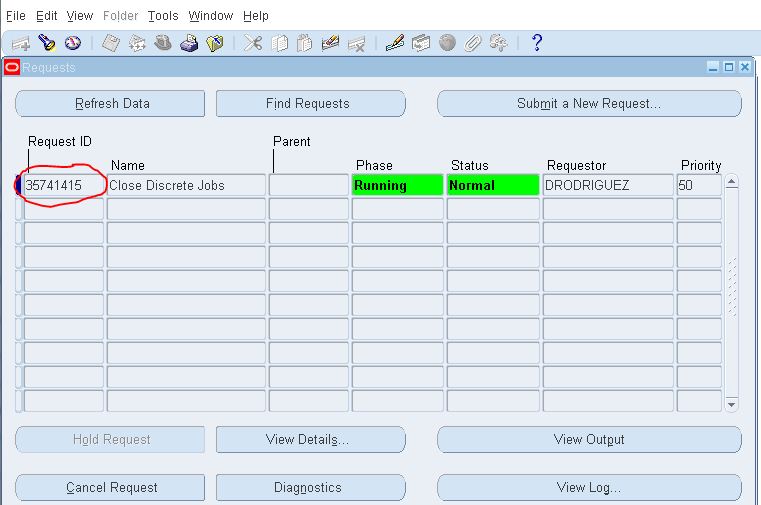
Even after cancel concurrent request, Resource related concurrent request process may not be released such processes are called RUNWAY processes. So we need to manually kill the processes from database.

Concurrent request id:

12345

Find OS Process id:

Select request_id,os_process_id from fnd_concurrent_requests where request_id=’3574145′;
REQUEST_ID   OS_PROCESS_ID
———-               ————
3574145                162

 Check runways:

select s.sid , s.serial# from v$session s , v$process p where s.paddr = p.addr and s.process =’162′;
SID    SERIAL#
—    ——-
46    1742

KILL RUNWAY PROCESS:

ALTER SYSTEM KILL SESSION ‘46,1742’;

FRM-92095: Oracle JInitiator version too low. Please install version 1.1.8.2

CAUSE: Latest version of Java installed and forms version is not compatible with currently installed JAVA

JRE_ERROR

SOLUTION:

1. Check the version of java installed in your system
2. If you already have latest version of JAVA, Please go and uninstall(via Control Panel > Add/Remove Software)
3. Download the latest version of 1.6 (like 1.6.0_25 to 1.6.0_29) and install.
4. Then try open the application again with same browser.

OR you can perform below steps:

Click on startà –> Control Panel

control_pannel

Click on programs

programs

Click on Java

java

Click on Java Tab as seen below

java_tab

Click on View

view

After clicking on View we see Runtime Parameters

We need to set -Djava.vendor=”Sun Microsystems Inc.” under Runtime Parameters

runtime_parameter

Click ok and click Apply.

Give a try if it resolves the problem !!

Thank You !!

Function not available to this responsibility : When accessing CUSTOM FORM

After fresh clone, Application technical team used to report that ‘Function not available to this responsibility’ error when they are trying to access custom form.

CAUSE:  Missing the entry of CUSTOM_TOP in default.env file

SOLUTION:

1. Login to APPLMGR user to application Linux server
[applmgr@EBSTEST]$ sudo su – applmgr

2. Go to $INST_TOP/ora/10.1.2/forms/server directory
[applmgr@EBSTEST]$ cd $INST_TOP/ora/10.1.2/forms/server

3. Add the missing CUSTOM_TOP entry to default.env
XXX_TOP=/U01/applmgr/r12/CUSTOM/xxX/12.0.0

4. Restart the middle tier services.

5. Retest the issue.

HOW TO FIND SYSADMIN PASSWORD – R12

Simple way to find out SYSADMIN password in R12, Please review below for the same

1) Connect to APPS USER
2) Create PACKAGE and PACKEGE BODY.
3) Query for PASSWORD by providing USERNAME

STEP 1:

$SQL> conn apps/welcome
Connected.

STEP 2:

CREATE OR REPLACE PACKAGE XXX_GET_PWD AS
FUNCTION decrypt (KEY IN VARCHAR2, VALUE IN VARCHAR2)
RETURN VARCHAR2;
END XXX_GET_PWD;
/

Package created.

CREATE OR REPLACE PACKAGE BODY XXX_GET_PWD AS
FUNCTION decrypt (KEY IN VARCHAR2, VALUE IN VARCHAR2)
RETURN VARCHAR2 AS
LANGUAGE JAVA NAME ‘oracle.apps.fnd.security.WebSessionManagerProc.decrypt
(java.lang.String,java.lang.String) return java.lang.String’;
END XXX_GET_PWD;

Package body created.

STEP 3:

SELECT Usr.User_Name,
Usr.Description,
XXX_GET_PWD.Decrypt (
(SELECT (SELECT XXX_GET_PWD.Decrypt (
Fnd_Web_Sec.Get_Guest_Username_Pwd,
Usertable.Encrypted_Foundation_Password)
FROM DUAL)
AS Apps_Password
FROM applsys.Fnd_User Usertable
WHERE Usertable.User_Name =
(SELECT SUBSTR (
Fnd_Web_Sec.Get_Guest_Username_Pwd,
1,
INSTR (Fnd_Web_Sec.Get_Guest_Username_Pwd,
‘/’)
– 1)
FROM DUAL)),
Usr.Encrypted_User_Password)
Password
FROM applsys.Fnd_User Usr
WHERE Usr.User_Name = ‘&User_Name’;
Enter value for user_name: SYSADMIN
old  21:  WHERE Usr.User_Name = ‘&User_Name’
new  21:  WHERE Usr.User_Name = ‘SYSADMIN’
USER_NAME     DESCRIPTION                   PASSWORD
————-         ——————–                 ——————–
SYSADMIN      System Administrator            sysadmin

TO FIND APPS PASSWORD, Check this…  https://oracledbamasters.wordpress.com/2013/11/11/how-to-find-apps-password-r12/
HOW TO FIND APPS PASSWORD – R12

Simple way to find out apps password in R12, Please review below for the same

1) Connect to SYSTEM or SYS USER
2) Create Function for to decrypt the encrypted password
3) Query for PASSWORD
4) Query for decrypt the password
5) Test the apps user connection

STEP 1:

[oracle@localhost]$sqlplus system/system_password
[oracle@localhost]$sqlplus / as sysdba

STEP 2:

$SQL>create FUNCTION apps.decrypt_get_pwd(in_chr_key IN VARCHAR2,in_chr_encrypted_pin IN VARCHAR2)
RETURN VARCHAR2 AS LANGUAGE JAVA NAME ‘oracle.apps.fnd.security.WebSessionManagerProc.decrypt(java.lang.String,java.lang.String) return java.lang.String’;
/

Function created.

STEP 3:

$SQL>select ENCRYPTED_FOUNDATION_PASSWORD from apps.fnd_user where USER_NAME=’GUEST’;
ENCRYPTED_FOUNDATION_PASSWORD
——————————————————————————–
ZG342073DB4A6F66E5ABB79D0E8BD64A5D4830ED4BB250407DF1DB9EEE786F895B78FB6F260E0101
85B830B8F49C6ECC2FAF

STEP 4:

$SQL>SELECT apps.decrypt_get_pwd(‘GUEST/ORACLE’,’ZG342073DB4A6F66E5ABB79D0E8BD64A5D4830ED4BB250407DF1DB9EEE786F895B78FB6F260E010185B830B8F49C6ECC2FAF
‘) from dual;
APPS.DECRYPT_PIN_FUNC(‘GUEST/ORACLE’,’ZG342073DB4A6F66E5ABB79D0E8BD64A5D4830ED4B
——————————————————————————–
welcome

STEP 5:

$SQL> conn apps/welcome
Connected.

TO FIND SYSADMIN PASSWORD, Check this … https://oracledbamasters.wordpress.com/2013/11/11/how-to-find-sysadmin-password-r12/