Category Archives: Oracle Apps DBA

cmclean.sql : Cleaning the Concurrent Manager tables

To cleanup running and pending requests we use cmclean.sql, If we stop concurrent managers using abort options then concurrent requests will be in running state ,Next when we start concurrent manager the processes will not start properly.

CMCLEAN will update below tables:
1) FND_CONCURRENT_QUEUES
2) FND_CONCURRENT_PROCESSES
3) FND_CONCURRENT_REQUESTS
4) FND_CONFLICTS_DOMAIN
5) FND_CONCURRENT_CONFLICT_SETS

GET CMCLEAN SCRIPT FROM ORACLE NOTEID:
Concurrent Processing – cmclean.sql – Non Destructive Script to Clean Concurrent Manager Tables [ID 134007.1]

—- SCRIPT —-
****************

REM
REM FILENAME
REM cmclean.sql
REM DESCRIPTION
REM Clean out the concurrent manager tables
REM NOTES
REM Usage: sqlplus @cmclean
REM
REM
REM $Id: cmclean.sql,v 1.4 2001/04/07 15:55:07 pferguso Exp $
REM
REM
REM +======================================================================+
set verify off;
set head off;
set timing off
set pagesize 1000
column manager format a20 heading ‘Manager short name’
column pid heading ‘Process id’
column pscode format a12 heading ‘Status code’
column ccode format a12 heading ‘Control code’
column request heading ‘Request ID’
column pcode format a6 heading ‘Phase’
column scode format a6 heading ‘Status’
WHENEVER SQLERROR EXIT ROLLBACK;
DOCUMENT
WARNING : Do not run this script without explicit instructions
from Oracle Support
*** Make sure that the managers are shut down ***
*** before running this script ***
*** If the concurrent managers are NOT shut down, ***
*** exit this script now !! ***
#
accept answer prompt ‘If you wish to continue type the word ”dual”: ‘
set feed off
select null from &answer;
set feed on
REM Update process status codes to TERMINATED
prompt
prompt ————————————————————————
prompt — Updating invalid process status codes in FND_CONCURRENT_PROCESSES
set feedback off
set head on
break on manager
SELECT concurrent_queue_name manager,
concurrent_process_id pid,
process_status_code pscode
FROM fnd_concurrent_queues fcq, fnd_concurrent_processes fcp
WHERE process_status_code not in (‘K’, ‘S’)
AND fcq.concurrent_queue_id = fcp.concurrent_queue_id
AND fcq.application_id = fcp.queue_application_id;
set head off
set feedback on
UPDATE fnd_concurrent_processes
SET process_status_code = ‘K’
WHERE process_status_code not in (‘K’, ‘S’);
REM Set all managers to 0 processes
prompt
prompt ————————————————————————
prompt — Updating running processes in FND_CONCURRENT_QUEUES
prompt — Setting running_processes = 0 and max_processes = 0 for all managers
UPDATE fnd_concurrent_queues
SET running_processes = 0, max_processes = 0;
REM Reset control codes
prompt
prompt ————————————————————————
prompt — Updating invalid control_codes in FND_CONCURRENT_QUEUES
set feedback off
set head on
SELECT concurrent_queue_name manager,
control_code ccode
FROM fnd_concurrent_queues
WHERE control_code not in (‘E’, ‘R’, ‘X’)
AND control_code IS NOT NULL;
set feedback on
set head off
UPDATE fnd_concurrent_queues
SET control_code = NULL
WHERE control_code not in (‘E’, ‘R’, ‘X’)
AND control_code IS NOT NULL;
REM Also null out target_node for all managers
UPDATE fnd_concurrent_queues
SET target_node = null;
REM Set all ‘Terminating’ requests to Completed/Error
REM Also set Running requests to completed, since the managers are down
prompt
prompt ————————————————————————
prompt — Updating any Running or Terminating requests to Completed/Error canceled by CMCLEAN
set feedback off
set head on
SELECT request_id request,
phase_code pcode,
status_code scode
FROM fnd_concurrent_requests
WHERE status_code = ‘T’ OR phase_code = ‘R’
ORDER BY request_id;
set feedback on
set head off
UPDATE fnd_concurrent_requests
SET phase_code = ‘C’, status_code = ‘E’
WHERE status_code =’T’ OR phase_code = ‘R’;
REM Set all Runalone flags to ‘N’
REM This has to be done differently for Release 10
prompt
prompt ————————————————————————
prompt — Updating any Runalone flags to ‘N’
prompt
set serveroutput on
set feedback off
declare
c pls_integer := dbms_sql.open_cursor;
upd_rows pls_integer;
vers varchar2(50);
tbl varchar2(50);
col varchar2(50);
statement varchar2(255);
begin
select substr(release_name, 1, 2)
into vers
from fnd_product_groups;
if vers >= 11 then
tbl := ‘fnd_conflicts_domain’;
col := ‘runalone_flag’;
else
tbl := ‘fnd_concurrent_conflict_sets’;
col := ‘run_alone_flag’;
end if;
statement := ‘update ‘ || tbl || ‘ set ‘ || col || ‘=”N” where ‘ || col || ‘ = ”Y”’;
dbms_sql.parse(c, statement, dbms_sql.native);
upd_rows := dbms_sql.execute(c);
dbms_sql.close_cursor(c);
dbms_output.put_line(‘Updated ‘ || upd_rows || ‘ rows of ‘ || col || ‘ in ‘ || tbl || ‘ to ”N”’);
end;
/
prompt
prompt ————————————————————————
prompt Updates complete.
prompt Type commit now to commit these updates, or rollback to cancel.
prompt ————————————————————————
prompt
set feedback on
REM <= Last REM statment —————————————————–
Disclaimer
EXCEPT WHERE EXPRESSLY PROVIDED OTHERWISE, THE INFORMATION, SOFTWARE,
PROVIDED ON AN “AS IS” AND “AS AVAILABLE” BASIS. ORACLE EXPRESSLY DISCLAIMS
ALL WARRANTIES OF ANY KIND, WHETHER EXPRESS OR IMPLIED, INCLUDING, BUT NOT
LIMITED TO, THE IMPLIED WARRANTIES OF MERCHANTABILITY, FITNESS FOR A PARTICULAR
PURPOSE AND NON-INFRINGEMENT. ORACLE MAKES NO WARRANTY THAT: (A) THE RESULTS
THAT MAY BE OBTAINED FROM THE USE OF THE SOFTWARE WILL BE ACCURATE OR
RELIABLE; OR (B) THE INFORMATION, OR OTHER MATERIAL OBTAINED WILL MEET YOUR
EXPECTATIONS. ANY CONTENT, MATERIALS, INFORMATION OR SOFTWARE DOWNLOADED OR
OTHERWISE OBTAINED IS DONE AT YOUR OWN DISCRETION AND RISK. ORACLE SHALL HAVE
NO RESPONSIBILITY FOR ANY DAMAGE TO YOUR COMPUTER SYSTEM OR LOSS OF DATA THAT
RESULTS FROM THE DOWNLOAD OF ANY CONTENT, MATERIALS, INFORMATION OR SOFTWARE.
ORACLE RESERVES THE RIGHT TO MAKE CHANGES OR UPDATES TO THE SOFTWARE AT ANY
TIME WITHOUT NOTICE.
Limitation of Liability
IN NO EVENT SHALL ORACLE BE LIABLE FOR ANY DIRECT, INDIRECT, INCIDENTAL,
SPECIAL OR CONSEQUENTIAL DAMAGES, OR DAMAGES FOR LOSS OF PROFITS, REVENUE,
DATA OR USE, INCURRED BY YOU OR ANY THIRD PARTY, WHETHER IN AN ACTION IN
CONTRACT OR TORT, ARISING FROM YOUR ACCESS TO, OR USE OF, THE SOFTWARE.
SOME JURISDICTIONS DO NOT ALLOW THE LIMITATION OR EXCLUSION OF LIABILITY.
ACCORDINGLY, SOME OF THE ABOVE LIMITATIONS MAY NOT APPLY TO YOU.

 

Enable/Disable Maintenanace Mode from SQLPLUS Session (Without adadmin)

We can enable or disable maintenance mode without using adutility (adadmin), Perform the same from SQLPLUS session.

Check the current status of Maintenance Mode:

select fnd_profile.value(‘APPS_MAINTENANCE_MODE’) from dual;

MAINT     =  MAINTENANCE MODE is ENABLED
NORMAL =  MAINTENANCE MODE is DISABLED

ENABLE maintenance mode:
sqlplus -s apps/apps @$AD_TOP/patch/115/sql/adsetmmd.sql ENABLE

DISABLE maintenance mode:
sqlplus -s apps/apps @$AD_TOP/patch/115/sql/adsetmmd.sql DISABLE

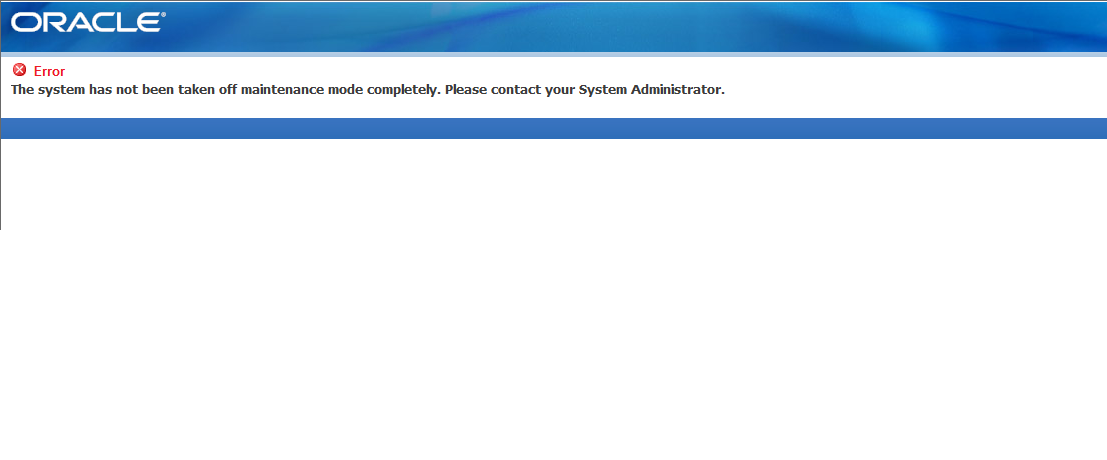
The system has not been taken off maintenance mode completely.Please contact your system adminstration.

The system has not been taken off maintenance mode completely.Please contact your system adminstration.

Maintenance_mode

Cause: After patch application, Maintenance mode is not disabled.

Solution :

1) login to applmgr user

2) run adadmin

3) use option 5 to disable maintenance mode

AD Administration Main Menu
————————————————–
1.    Generate Applications Files menu
2.    Maintain Applications Files menu
3.    Compile/Reload Applications Database Entities menu
4.    Maintain Applications Database Entities menu
5.    Change Maintenance Mode
6.    Exit AD Administration

Enter your choice [6] : 5
Please select an option:
1.    Enable Maintenance Mode
2.    Disable Maintenance Mode
3.    Return to Main Menu

Enter your choice [3] : 2

sqlplus -s &un_apps/***** @/apps/vision/apps/apps_st/appl/ad/12.0.0/patch/115/sql/adsetmmd.sql DISABLE
Successfully disabled Maintenance Mode.

Concurrent Manager Issue : FND_DCP.REQUEST_SESSION_LOCK / DBMS_LOCK.Request

Error in Concurrent manager logfile :
=========================

Routine FND_DCP.REQUEST_SESSION_LOCK received a result code of 1 from the call to DBMS_LOCK.Request.
Possible DBMS_LOCK.Request resultCall to establish_icm failed
The Internal Concurrent Manager has encountered an error.

Resolve the issue in two ways:

Solution 1 (Bounce database):
1. Stop all the services and make sure that all the concurrent managers completely down.
2. Stop and restart the database
3. Restart all the services and concurrent managers

Solution 2 (Without database bounce):

1. Stop the concurrent managers cleanly.
2. Check for the database locks and kill the locks related to CM.
3. Run cmlean.sql with apps user.
4. Start the concurrent managers.

Check for CM Locks:

SQL> SELECT v$access.sid, v$session.serial#
FROM v$session,v$access
WHERE v$access.sid = v$session.sid and v$access.object = ‘FND_CP_FNDSM’
GROUP BY v$access.sid, v$session.serial#;

SID          SERIAL#
———- ———-
2000         1000

sql> alter system kill session ‘2000,1000’;

DBMS_LOCK.Request

FNDFS Error- unable to view Concurrent program LOG and OUT files

An error occurred while attempting to establish an Applications File Server connection with the node FNDFS_APPLTOP_ . There may be a network configuration problem, or the TNS listener on node FNDFS_APPLTOP_ may not be running.Please contact your system administrator.

Problem : In R12, After running a Concurrent request, Unable to view LOG and OUT files of the Concurrent request and returns above error message.

Cause : The RRA is Not Enabled in the Profile Option.

Solution :
In the Profile Option –>system –> RRA ->RRA: Enabled is set as No in Site Level. Make it to Yes.
Save and Logout and Retest the Issue.

New Feature – AFPASSWD utility in EBS 12.1.2

Oracle has introduced a new utility to change the Oracle E-Business Suite passwords in R12.1.2, AFPASSWD is an enhanced version of FNDCPASS utility.

1) AFPASSWD only prompts for passwords required for the current operation. allowing separation of duties between applications administrators and database administrators.

2) AFPASSWD can be run from the database tier as well as the application tier. In contrast, FNDCPASS can only be run from the application tier.

3) This also improves interoperability with Oracle Database Vault. In contrast, the FNDCPASS utility currently requires specification of the APPS and the SYSTEM usernames and corresponding passwords, preventing separation of duties between applications administrators and database administrators.

3) When changing a password with AFPASSWD, the user is prompted to enter the new password twice to confirm.

SAMPLE OUTPUT: Changing SYSADMIN Password  

$AFPASSWD -f SYSADMIN  
Enter the ORACLE password of Application Object Library ‘APPSUSER’:  
Connected successfully to APPS.  Working…  
Enter new password for user [SYSADMIN]:  
Verify new password for user [SYSADMIN]:  
Password is changed successfully for user SYSADMIN.  
AFPASSWD completed successfully.
 

SAMPLE OUTPUT: Changing APPLSYS Password

$AFPASSWD -c apps@PROD -s APPLSYS  
Enter the ORACLE password of Application Object Library ‘APPSUSER’:  
Connected successfully to APPS.  
Enter the password for your ‘SYSTEM’ ORACLE schema:  
Connected successfully to SYSTEM.  Working…  
Enter new password for user:  
Verify new password for user:  
Working…  
AFPASSWD completed successfully.


Imporatant – Concurrent Manager Issues

1) Running FND_CONC_CLONE.SETUP_CLEAN

Note : In the case of a clone instance, it is strongly recommended to clean the non – existing nodes

FND_NODE table contains the node entries of both SOURCE environment and TARGET environment after clone.

If u want to get rid of the source node entries

a. Stop all middle tier services including the concurrent managers.

b. Stop the database.

c. Start the database.

d. Connect SQLPLUS as APPS user and run the following :

EXEC FND_CONC_CLONE.SETUP_CLEAN;

COMMIT;

EXIT;

e. Run AutoConfig on all tiers, firstly on the DB tier and then the APPS tiers and webtiers to repopulate the required system tables.

2) Executing afdcm037.sql – Create The Service Manager “FNDSM”

NOTE: This script will create libraries for FNDSM and create managers for preexisting nodes.

If Service Manager is not running , To create the Service Manager “FNDSM” Please perform below steps.

a. Log in as applmgr

b. cd to $FND_TOP/patch/115/sql

c. Run the script: afdcm037.sql

Check again that FNDSM entries now exist: select CONCURRENT_QUEUE_NAME from FND_CONCURRENT_QUEUES where CONCURRENT_QUEUE_NAME like ‘FNDSM%’;

3) Relink the binaries FNDLIBR, FNDSM, FNDFS and FNDCRM

It is better to relonk the binaries once, If Concurrent Managers do not start for the cloned Instance.

Go to cd $FND_TOP/bin

$ adrelink.sh force=y “fnd FNDLIBR”

$ adrelink.sh force=y “fnd FNDSM”

$ adrelink.sh force=y “fnd FNDFS”

$ adrelink.sh force=y “fnd FNDCRM”

4) Run CMCLEAN.sql, To Clean Concurrent Manager Tables.

Cleaning out the Concurrent Manager tables is a useful method of making sure that there are no invalid statuses that can prevent the managers from starting.

a.  Log in as APPS user

b.  Run the script: cmclean.sql

c.  COMMIT;

Find Concurrent manager logs on Oracle Apps

Concurrent Mangers log files are located in the $APPLCSF/$APPLLOG location.

cd $APPLCSF/$APPLLOG

For ICM Log                                       –> ls -lrt *$TWO_TASK*

For Standard manager Log                  –> ls -lrt w*.mgr

For Conflict Resolution manager Log –> ls -lrt c*.mgr

We can also get the ICM manager logfile location with below query

SELECT ‘ICM_LOG_NAME=’ || fcp.logfile_name

FROM fnd_concurrent_processes fcp, fnd_concurrent_queues fcq

WHERE fcp.concurrent_queue_id = fcq.concurrent_queue_id

AND fcp.queue_application_id = fcq.application_id

AND fcq.manager_type = ‘0’

AND fcp.process_status_code = ‘A’;

Sample Output:

SQL> SELECT ‘ICM_LOG_NAME=’ || fcp.logfile_name

2  FROM fnd_concurrent_processes fcp, fnd_concurrent_queues fcq

3  WHERE fcp.concurrent_queue_id = fcq.concurrent_queue_id

4  AND fcp.queue_application_id = fcq.application_id

5  AND fcq.manager_type = ‘0’

6  AND fcp.process_status_code = ‘A’;

‘ICM_LOG_NAME=’||FCP.LOGFILE_NAME

——————————————————————————–

ICM_LOG_NAME=/u01/PROD/inst/apps/PROD_oracle-master/logs/appl/conc/log/PROD_0712.mgr