ORA-19693: backup piece already included

PROBLEM:

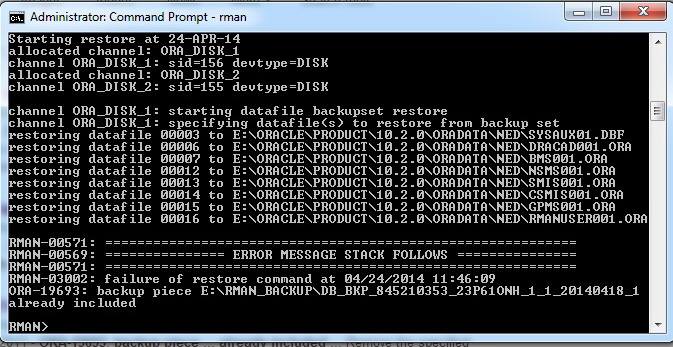
Encounter the following errors when trying to duplicate the database to another server using the RMAN backup:

ORA-19693: backup piece E:\RMAN_BACKUP\xxxxxxxxxxx already included

10168047_748681825176303_456468755789080273_n

SOLUTION:

The location of the RMAN backup pieces at the target and auxiliary/duplicate databases are
different. So, RMAN cannot see the RMAN backup pieces, because they are stored in a different directory at the auxiliary/duplicate database server.

Try with below command which may resolve issue
RMAN> catalog start with ‘E:\RMAN_BACKUP’;


Thank You !!

ORA-01940: cannot drop a user that is currently connected

SQL>drop user MY_USER cascade;
drop user username cascade
*
ERROR at line 1:
ORA-01940: cannot drop a user that is currently connected

SQL>select s.sid, s.serial#, s.status, p.spid from v$session s, v$process p where s.username = ‘MY_USER’ and p.addr (+) = s.paddr;
SID           SERIAL#       STATUS           SPID
———   ———-    ——–       ————
579               27        INACTIVE        17849
279                9        INACTIVE        89543

SQL> alter system kill session ‘579,29’;
System alterred.

SQL> alter system kill session ‘279,9’;
System alterred.

Now try to drop USER:

SQL>drop user MY_USER cascade;
User dropped.

Thank You !!

Delete expired archivelogs using RMAN

Below commands will helpful for deleting expired archivelog files through RMAN :

RMAN>list expired archivelog all;

RMAN>crosscheck archivelog all;

RMAN>delete noprompt expired archivelog all;

Now check the output with below command it should not return any list

RMAN> list expired archivelog all;
using target database control file instead of recovery catalog
specification does not match any archived log in the repository
RMAN>


Thank You !!

Unable to authenticate session – EBS R12

EBS logon is failing with following error:

“Unable to Authenticate Session”

SOLUTION 1:

1. Clear the Browser cache.
2. Stop all Browser sessions.
3. Start a new Browser session and logon to the Instance.

Go to Tools >Internet Options > Click on delete browsing Cache (shown below)

ie_cache

SOLUTION 2:

Oracle E-Business Suite environment with IE8 and higher, When you are now logging out from your DEV Instance and want to login to the TEST- or PROD-Instance it happens “Unable to authenticate session”

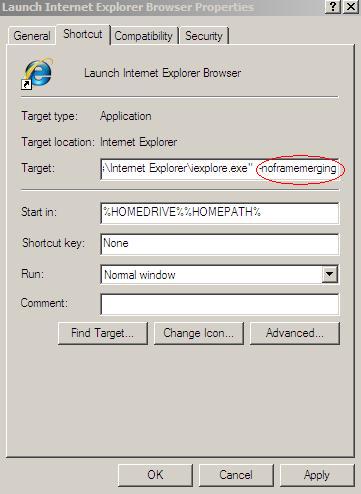
Go to all programs, Right click on your IE icon and add -noframemerging to the end of the link in the Target field e.g.”C:\Program Files\Internet Explorer\iexplore.exe” -noframemerging (shown below)

1)  Start -> Program Files
2)  Right click on the Internet Explorer icon and select Properties
3)  Add -nomerge to the end of the link in the Target field i.e.
“C:\Program Files\Internet Explorer\iexplore.exe” -noframemerging
4)  Click the OK button to close the window
5)  This icon may then be copied to the desktop if desired.

ie_properties

Thank You !!

Could not reserve record (2 tries). Keep trying?

When attempting to reset User password (Security / User / Define form) in R12, the following error occurs.

ERROR:

“Could not reserve record (2 tries). Keep trying?”

CAUSE:

Seams that it was there a deadlock to a session.

SOLUTION:

1. The session that has a deadlock should be killed
Or
2. Bounce the application including database.

Thank You !!

ORA-12547 TNS: Lost Contact

Getting the following error when trying to connect using Sql*Plus

ERROR:
$sqlplus / as sysdba
SQL*Plus: Release 11.1.0.7.0 – Production on Wed Mar 30 11:59:06 2011
Copyright (c) 1982, 2008, Oracle. All rights reserved.
ERROR:
ORA-12547: TNS:lost contact

CAUSE:

1) to kernel parameters settings
2) Incorrect permissions on the ORACLE executable
3) Insufficient ulimit setting for stack
4) $ORACLE_HOME/rdbms/lib/config.o is 0 bytes
5) Oracle binaries have not been linked correctly

SOLUTION:

1) Please check the notes below that provide the required settings for kernel parameters
Note 169706.1 Oracle Database on AIX,HP-UX,Linux,MacOSX,Solaris,Tru64

2) Please check permissions by running:

$ cd $ORACLE_HOME/bin
$ ls -l oracle
The output should show the correct permission which is:

-rwsr-s–x 1 oracle dba

If not, then please execute the following to correct the permissions:
$ cd $ORACLE_HOME/bin
$ chmod 6751 oracle
$ ls -l oracle

3) Check the current ulimit setting for stack:

ulimit -a

Check the install guide for your specific platform and version of Oracle and set the stack appropriately.

4) Check to ensure the following two files are not 0 bytes:

$ORACLE_HOME/bin/oracle
$ORACLE_HOME/rdbms/lib/config.o

If yes, rename the following file:

$ cd $ORACLE_HOME/rdbms/lib
$ mv config.o config.o.bad

Then, relink the oracle binary:
$ relink oracle

5) Check the alert log for any errors (ORA-00020: maximum number of processes) and solve.

select * from v$resource_limit and check maximum utilization and limit values.

RESOURCE_NAME      MAX_UTILIZATION LIMIT_VALUE
————-           ————————– ————————–
processes      350                350
sessions      380                380

6) If the above does not resolve I suggest that you shutdown the database and listener and then “relink all”

Please refer the ORACLE SUPPORT DOCUMENT ID 422173.1


Thank You !!
Disable Case Sensitive in Oracle Database 11g

Prior to 11g Passwords in Oracle are not case sensitive. Now from 11g Oracle passwords are Case sensitive. Parameter sec_case_sensitive_logon has been included in Oracle 11g.

sql> create user test identified by test;
sql> Grant create session to test;
SQL> show parameter logon
NAME                                       TYPE                              VALUE
—————————-     ———————-   ——————————
sec_case_sensitive_logon     boolean                           TRUE

SQL> conn test/TEST
ERROR:
ORA-01017: invalid username/password; logon denied
Warning: You are no longer connected to ORACLE.

SQL> conn test/test
Connected.

Disable Password case sensitive:

SQL> alter system set sec_case_sensitive_logon=false;
System altered.

SQL> conn test/TEST
Connected.

Thank You !!

Find size of Table,Index and USER/SCHEMA in Oracle

How to find size of Table or Index or User/Schema in Oracle Database.

SIZE OF TABLE:

Select segment_name,sum(bytes)/1024/1024/1024 as “SIZE in GB” from user_segments where segment_name=’TABLE_NAME’ group by segment_name;

OR

select owner,segment_name,sum(bytes)/1024/1024/1024 as “SIZE in GB” from dba_segments where owner=’SCHEMA_NAME’ and segment_name=’TABLE_NAME’ group by owner,segment_name;

SIZE OF INDEX:

select segment_name,sum(bytes)/1024/1024/1024 as “SIZE in GB” from user_segments where segment_name=’INDEX_NAME’ group by segment_name;

OR

select owner,segment_name,sum(bytes)/1024/1024/1024 as “SIZE in GB” from dba_segments where owner=’SCHEMA_NAME’ and segment_name=’INDEX_NAME’ group by owner,segment_name

SIZE OF A USER/SCHEMA:

select owner,sum(bytes)/1024/1024/1024 as “SIZE in GB” from dba_segments where owner=’SCHEMA_NAME’ group by owner;


Thank You !!

Oracle 11gR2 installation on windows machine

Oracle Database Patch Set 11.2.0.2 (Patch#10098816) for Win32 and Win64 is available in Oracle support for downloading.

download

After downloading patchset, Unzip the patch which will creates folder “database”

Run the setup executable with “Run as administrator”

run

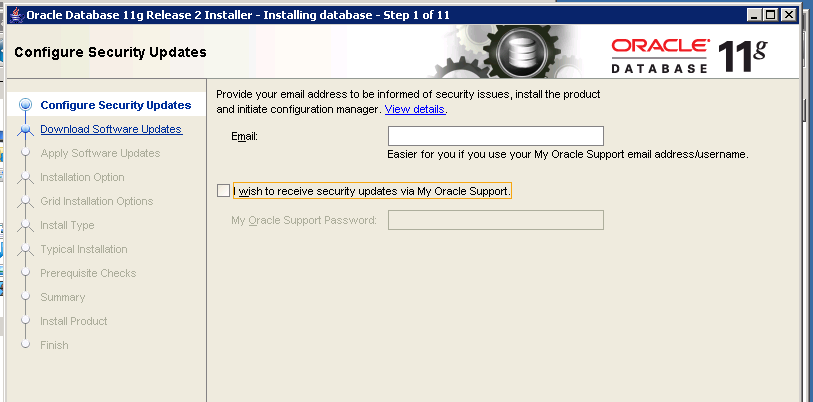
Unchecked the box for not to receive any security updates from Oracle Support

skip

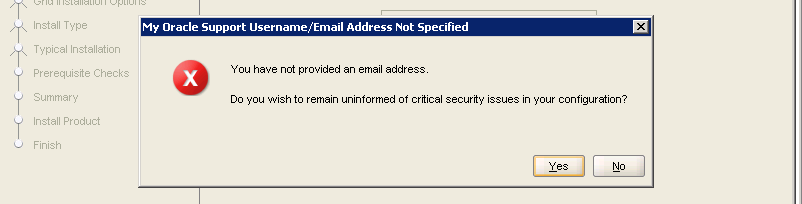
skip1

Click on Skip software updates radio button

skip3

Click on instal database software only, As we are installing only software.

install1

single

english

enterprise

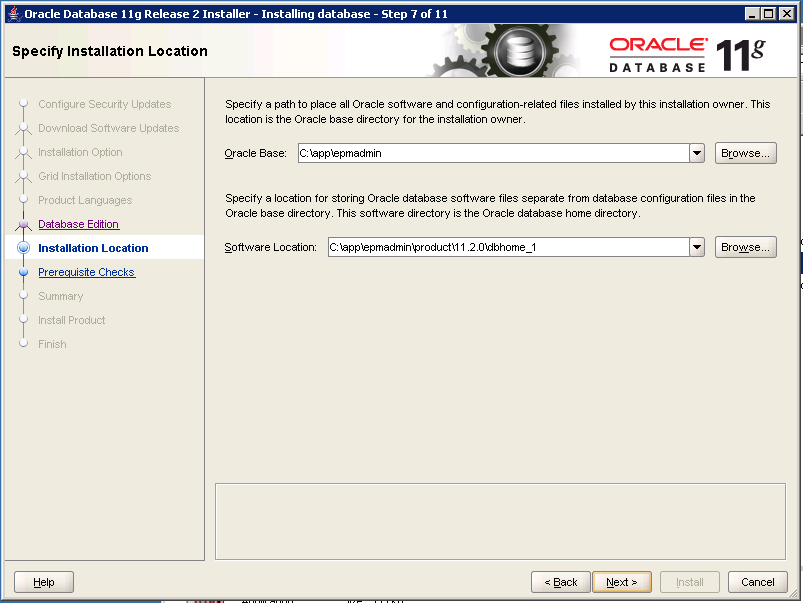
location

summary

progress

success


Thank You !!