ORA-27125: unable to create shared memory segment when run DBCA

I have installed 10gR2 on linux environment, When running DBCA it got filed with below error

ORA-27125: unable to create shared memory segment

SOLUTION:

cd $ORACLE_HOME/bin
 
mv oracle oracle.bin
 
 
—- Paste it as one —
 
cat >oracle <<“EOF”
#!/bin/bash
export DISABLE_HUGETLBFS=1
exec $ORACLE_HOME/bin/oracle.bin $@
EOF
 
—- End of paste —

chmod +x oracle

Thank You !!

NID Utility in Oracle – RENAME DATABASE

DBNEWID (NID) utility was introduced in Oracle 10g, Which can change the database identifier (DBID) and the database name (DBNAME).

NID utility allows us to change

  • Only DBID
  • Only DBNAME
  • Both DBNAME and DBID of a database

Before performing below changes, Database should be in MOUNT status.

SHUTDOWN IMMEDIATE
STARTUP MOUNT

DBID Only:

nid TARGET=sys/password@PROD

DBNAME Only:

nid TARGET=sys/password@PROD DBNAME=TEST SETNAME=YES

BOTH DBNAME and DATABASE:

nid TARGET=sys/password@PROD DBNAME=TEST

RMAN COLD BACKUP AND RESTORE

Simple RMAN script to take cold database backup:

For taking RMAN cold database backup, Database should be in mount status, Which can be noticed from below scipt.

mkdir -p /BACKUP/PROD
mkdir -p /BACKUP/PROD/log

$cold_backup.sh
export ORACLE_HOME=/u01/app/oracle/product/11.2.0
export ORACLE_SID=PROD
export PATH=$ORACLE_HOME/bin:$PATH
export LD_LIBRARY_PATH=$ORACLE_HOME/lib:$LD_LIBRARY_PATH
rman target / log=/BACKUP/PROD/log/PROD`date +%d%m%Y`.log <<EOF
sql ‘alter system checkpoint’;
shutdown immediate;
startup mount;
sql “create pfile=”/BACKUP/PROD/pfile`date +%d%m%Y`.ora” from spfile”;
RUN {
ALLOCATE CHANNEL disk1 DEVICE TYPE DISK FORMAT ‘/BACKUP/PROD/%U’;
ALLOCATE CHANNEL disk2 DEVICE TYPE DISK FORMAT ‘/BACKUP/PROD/%U’;
ALLOCATE CHANNEL disk3 DEVICE TYPE DISK FORMAT ‘/BACKUP/PROD/%U’;
BACKUP AS COMPRESSED BACKUPSET DATABASE;
BACKUP CURRENT CONTROLFILE FORMAT ‘/BACKUP/PROD/cntrl_%s_%p_%t’;
RELEASE CHANNEL disk1;
RELEASE CHANNEL disk2;
RELEASE CHANNEL disk3;
}
script execution:
./cold_backup.sh

Simple RMAN script to RESTORE DATABASE:

Make sure that rman backup is mounted on target system and necessary directories configured same as source system
$restore.sh
run
{
startup pfile=’/BACKUP/PROD/pfilexxxxxxx.ora’ nomount;
restore controlfile from ‘/BACKUP/PROD/cntrl_xxxxxxx’;
alter database mount;
restore database;
alter database open resetlogs;
}
script execution:
$rman target /
rman>@restore.sh

Finally change the database name using nid (DBNEWID) utility.

DATABASE HANGS

ERROR MESSAGE IN ALERTLOG FILE:

ORACLE Instance PROD – Archival Error
ORA-16038: log 4 sequence# 9961 cannot be archived
ORA-19502: write error on file “”, block number  (block size=)
ORA-00312: online log 4 thread 1: ‘/u01/oradata/data01/PROD/redo04.log’
ORA-16014: log 4 sequence# 9961 not archived, no available destinations

CAUSE:  Default archive log destination is 100% used, There is no space to create additional archive log

POSSIBLE ISSUES BECAUSE of archiving is stuck:

1. Database Hangs
2. Users not able to connect to database
3. Not able to open the database
4. Archive  space related error in alertlog file(ORA-16038,ORA-16014,ORA-19809 )

POSSIBLE SOLUTIONS:

1. Increase the ARCHIVE DESTINATION size
2. Take backup of the archivelogs to different location.
3. Change archivelogs destination to some other mountpoint.
4. Delete archivelogs to make more space. ( should be the last option) and in case of standby database make sure those logs are already applied to standby.
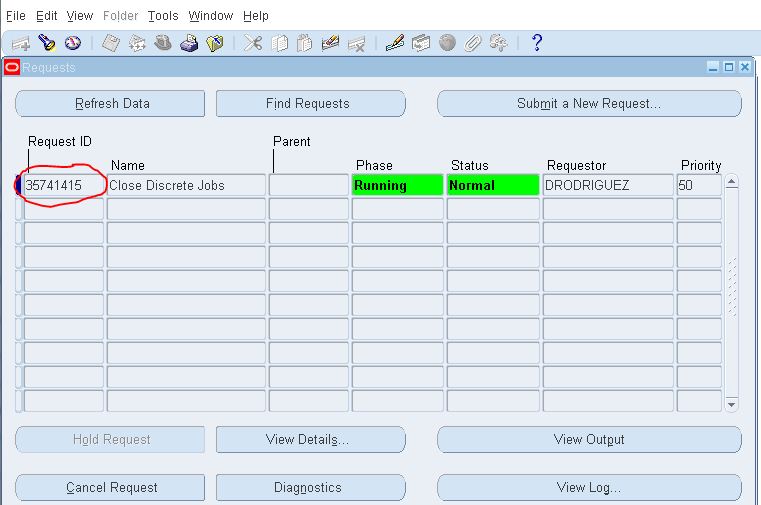
Terminate runway process of cancel concurrent request

Even after cancel concurrent request, Resource related concurrent request process may not be released such processes are called RUNWAY processes. So we need to manually kill the processes from database.

Concurrent request id:

12345

Find OS Process id:

Select request_id,os_process_id from fnd_concurrent_requests where request_id=’3574145′;
REQUEST_ID   OS_PROCESS_ID
———-               ————
3574145                162

 Check runways:

select s.sid , s.serial# from v$session s , v$process p where s.paddr = p.addr and s.process =’162′;
SID    SERIAL#
—    ——-
46    1742

KILL RUNWAY PROCESS:

ALTER SYSTEM KILL SESSION ‘46,1742’;

FRM-92095: Oracle JInitiator version too low. Please install version 1.1.8.2

CAUSE: Latest version of Java installed and forms version is not compatible with currently installed JAVA

JRE_ERROR

SOLUTION:

1. Check the version of java installed in your system
2. If you already have latest version of JAVA, Please go and uninstall(via Control Panel > Add/Remove Software)
3. Download the latest version of 1.6 (like 1.6.0_25 to 1.6.0_29) and install.
4. Then try open the application again with same browser.

OR you can perform below steps:

Click on startà –> Control Panel

control_pannel

Click on programs

programs

Click on Java

java

Click on Java Tab as seen below

java_tab

Click on View

view

After clicking on View we see Runtime Parameters

We need to set -Djava.vendor=”Sun Microsystems Inc.” under Runtime Parameters

runtime_parameter

Click ok and click Apply.

Give a try if it resolves the problem !!

Thank You !!

Function not available to this responsibility : When accessing CUSTOM FORM

After fresh clone, Application technical team used to report that ‘Function not available to this responsibility’ error when they are trying to access custom form.

CAUSE:  Missing the entry of CUSTOM_TOP in default.env file

SOLUTION:

1. Login to APPLMGR user to application Linux server
[applmgr@EBSTEST]$ sudo su – applmgr

2. Go to $INST_TOP/ora/10.1.2/forms/server directory
[applmgr@EBSTEST]$ cd $INST_TOP/ora/10.1.2/forms/server

3. Add the missing CUSTOM_TOP entry to default.env
XXX_TOP=/U01/applmgr/r12/CUSTOM/xxX/12.0.0

4. Restart the middle tier services.

5. Retest the issue.

DATABASE SIZE (datafiles + tempfiles + redologfiles)

To get accurate size of the database, We have to combined the sizes of all datafiles, tempfiles and redologfiles.

select round ((a.data_size+b.temp_size+c.redo_size)/1024/1024/1024,2) “DB_size_in_GB”
from ( select sum(bytes) data_size
from dba_data_files ) a,
( select nvl(sum(bytes),0) temp_size
from dba_temp_files ) b,
( select sum(bytes) redo_size
from sys.v_$log ) c;