EBS logon is failing with following error:
“Unable to Authenticate Session”
SOLUTION 1:
1. Clear the Browser cache.
2. Stop all Browser sessions.
3. Start a new Browser session and logon to the Instance.
Go to Tools >Internet Options > Click on delete browsing Cache (shown below)

SOLUTION 2:
Oracle E-Business Suite environment with IE8 and higher, When you are now logging out from your DEV Instance and want to login to the TEST- or PROD-Instance it happens “Unable to authenticate session”
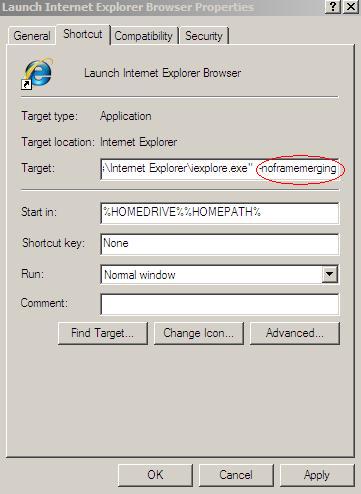
Go to all programs, Right click on your IE icon and add -noframemerging to the end of the link in the Target field e.g.”C:\Program Files\Internet Explorer\iexplore.exe” -noframemerging (shown below)
1) Start -> Program Files
2) Right click on the Internet Explorer icon and select Properties
3) Add -nomerge to the end of the link in the Target field i.e.
“C:\Program Files\Internet Explorer\iexplore.exe” -noframemerging
4) Click the OK button to close the window
5) This icon may then be copied to the desktop if desired.
Thank You !!
 ORACLE CLOUD DBA BLOG
It’s very simple to find out any topic on net as compared to books,
as I found this post at this web page.
Thank You !!
Pretty nice post. I just stumbled upon your weblog and wished to
say that I have truly enjoyrd surfing around your blog posts.
In any case I will be subscribing to your
feed and I hope you write again very soon!
Thank You !